Audit and compliance with Liquibase Secure:
Change authorization best practices
When auditors review your database change process, they want to see clear evidence of who authorized each change and when it was made. Liquibase Secure helps you establish proper authorization controls that satisfy compliance requirements while maintaining an efficient development process. This guide explains the best practices for implementing these controls.
Why authorization matters
Auditors need to see a clear path of all database changes. They want to ensure they're reviewed, approved, and the change process is documented. Common audit findings include:
Production changes with no documented approval
Unclear who has the authority to approve changes
No record of when approvals were granted
Missing link between approved requests and actual deployments
Fixing these issues creates a clear audit trail from change request through approval to deployment.
The authorization challenge
Unlike traditional IT systems, where you directly control who can take actions, database authorization works differently. You typically can't restrict who can authorize database changes at the database level itself. Instead, you establish authorization controls through your process and tooling.
This means building an approval workflow where:
Changes require documented approval before deployment
Approvals are captured and logged
Only approved changes make it to production
The audit trail connects requests, approvals, and deployments
Core best practices
- Use a ticketing system for change requests
The practice: Every production database change begins with a formal ticket in your ITSM system (e.g., Jira, ServiceNow).
Implementation:
Configure your ticketing system with a "Database Change Request" ticket type.
Include required fields: description, affected systems, business justification, risk assessment.
Set up approval workflows based on change risk (low/medium/high).
Require ticket numbers in deployment pipelines.

Why it matters:
Creates a formal record of what change was requested and why
Provides a centralized place for approvals
Generates timestamps for when requests were created and approved
Gives auditors a clear paper trail
- Store everything in source control
The practice: All database changes, such as Liquibase Secure changelogs, migration scripts, and rollback plans, must be stored in a source control repository like GitHub, GitLab, or Bitbucket.
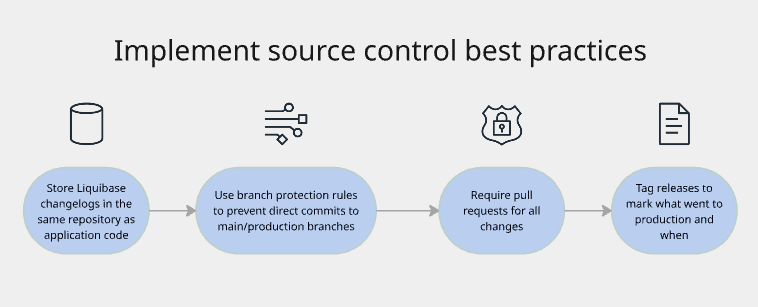
Why it matters:
Creates immutable history of all changes
Shows who wrote each change and when
Enables code review before changes are approved
Provides rollback capability if needed
Auditors can trace any change back to its origin
Keep in mind:
Never make database changes outside of source control
Include meaningful commit messages explaining what and why
Keep changelogs organized by feature, release, or sprint
Use semantic versioning for changelog organization
- Implement automated testing with Policy Checks
The practice: Run automated validation against all database changes before they're approved or deployed.
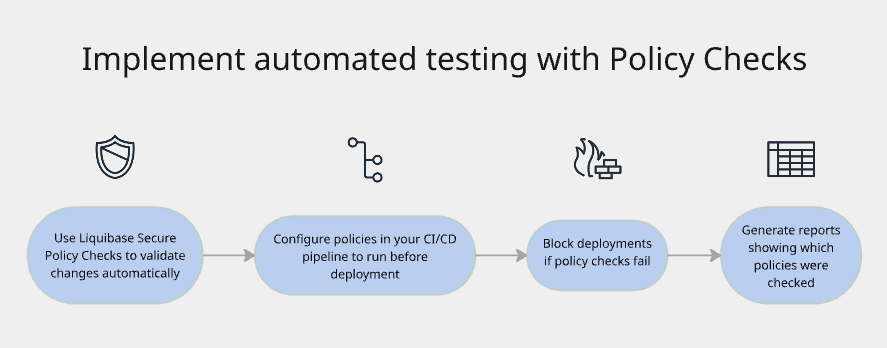
Why it matters:
Catches risky or non-compliant changes before humans review them
Enforces organizational standards consistently
Reduces human error in reviews
Provides objective evidence of compliance
Frees up reviewers to focus on business logic, not policy compliance
What Liquibase Secure policy checks should I implement?
Security policies: Flag changes that grant excessive privileges or access to sensitive data | SQLGrantAdminWarn SqlGrantOptionWarn SqlGrantSpecificPrivsWarn SqlGrantWarn |
Data integrity: Validate foreign keys, constraints, and indexes | |
Operational standards: Require rollback scripts, check for breaking changes | ChangesetLabelCheck OneChangePerChangeset RollbackRequired PrimaryKeyOnCreateTable RequireChangesetIDisUUID |
Performance: Flag missing indexes on foreign keys or large table scans | SqlSelectStarWarn CheckTablesForIndex PrimaryKeyOnCreateTable |
- Require peer review
The practice: At least one other person must review and approve database changes before they go to production.
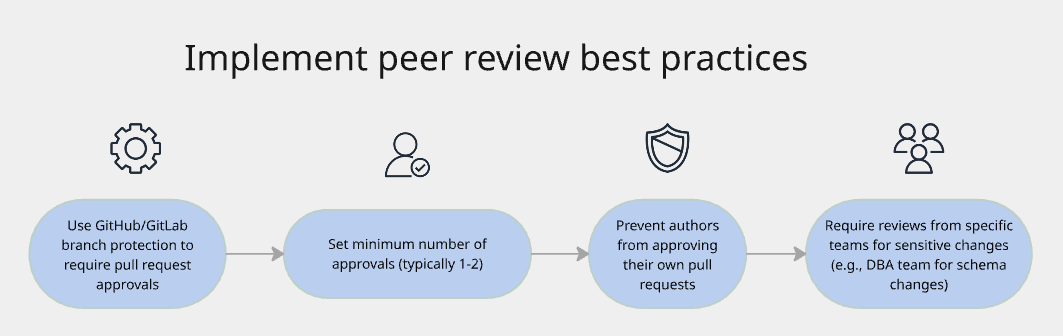
Why it matters:
Implements segregation of duties (developer ≠ approver)
Catches errors and security issues the author missed
Spreads knowledge across the team
Creates documented approval in the form of pull request approvals
Satisfies audit requirements for human oversight
Use this example checklist table during your peer review:
Checklist questions | Tech lead sign off | DBA sign off | Security team sign off | Compliance Team sign off |
Does this change match the approved ticket? | ||||
Are there any security concerns? | ||||
Will this impact performance? | ||||
Is there a rollback plan? | ||||
Are indexes and constraints properly defined? | ||||
Is sensitive data properly protected? |
- Only Liquibase Secure should deploy database changes
The practice: All production database changes must be implemented through Liquibase Secure, rather than direct database modifications, manual scripts, or GUI tools.
Why it matters:
Creates a consistent, trackable deployment method
Ensures all changes are versioned and logged
Prevents unauthorized ad-hoc changes
Provides a complete audit trail in Liquibase Secure's DATABASECHANGELOG table
Enables automated rollback if needed

Additional best practices for preventing direct access:
Store production credentials in secrets management (Vault, AWS Secrets Manager)
Grant access only to CI/CD service account
Use database-level permissions to restrict DDL operations
Enable database audit logging to detect unauthorized changes
Set up alerts for changes made outside Liquibase Secure