Get Started with Liquibase 5.0
Last updated: September 2, 2025
This tutorial is intended for developers setting up Liquibase for the first time. It walks you through installing Liquibase and exploring its basic functionality using the built-in sandbox. The sandbox includes a packaged H2 database and pre-made changelog files so you can practice running Liquibase commands immediately.
Add a Changeset to the Changelog
Now that you have set up your Liquibase example project, you can set add a changeset to the changelog.

Phase 3 of 4: Add a changeset
1
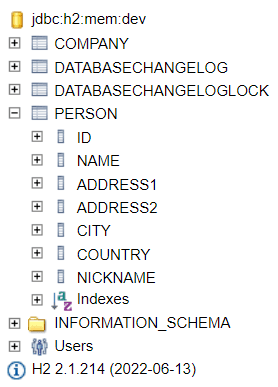
Using a text editor open the example-changelog file and add the following changeset to the end of the file.
--changeset your.name:4
ALTER TABLE person ADD nickname varchar(30);2
Save and close example-changelog
3
Enter the following command
liquibase updateLiquibase displays the following output:
Running Changeset: example-changelog.yaml::4::your.name
Liquibase command 'update' was executed successfully.
4